Best Robot Gifts by Recipient and Budget
Pick robot gifts by age: Sphero indi for Pre-K and up, Makeblock mBot2 for Age 6+, and the Joy for All Companion Cat for an older relative. At The Bot Scout, we have not hands-on tested these robots, so every price, age line and spec on this page comes from the maker's own site. For an adult, choose Living.ai EMO for a desk or KEYi Tech's Loona for the floor.
Makeblock mBot2 at $94.99 and Miko Mini at $149 are sale prices.
Skip both Miko robots if the recipient's home has no Wi-Fi, because Miko requires Wi-Fi for setup. Skip Petoi Bittle for a child under 10 unless an adult will help, since Petoi says Bittle is best suited to users aged 10 and older.
| Robot | Best for | Listed price (Oct 2026) | Age fit | Why it works as a gift |
|---|---|---|---|---|
| Sphero indi Single Student Kit | Preschoolers who code with no screen | $150.00 | Pre-K and up (grades pre-K to 3) | The child places color tiles, each a coded instruction, and indi follows them |
| Learning Resources Botley 2.0 | Screen-free coding from age 5 | Varies by seller | 5 and up | Coded with a remote programmer and coding cards, with no screen |
| Wonder Workshop Dash | Kids moving from blocks to JavaScript | $189.99 | 5 to 14 | Blockly Pro switches between blocks and JavaScript on the same robot |
| Miko Mini | Kids 5 to 10 on a smaller budget than Miko 3 | $149 sale (regular $199); sale option marked sold out | 5 to 10 | Face and voice recognition at a lower price than Miko 3 |
| Miko 3 | Kids 5 to 10 who want games and stories | $299 (shown sold out); Max subscription $99 a year extra | 5 to 10 | Plays about 6 to 7 hours per charge; the parent app turns off the camera or mic in one tap |
| Makeblock mBot2 | A first coding kit for ages 6 and up | $94.99 limited-time (from $149.99) | 6+ | Coding starts in blocks and moves to Python in the same mBlock software |
| Sphero BOLT | Coders moving from drawing and blocks to JavaScript | $179 | Not stated by maker | Coded by drawing, blocks or text; charges on an included inductive base |
| Petoi Bittle | Ages 10 and up who want to build a robot dog | $349.00 | 10 and older; younger with adult supervision | Sold as a kit to build or pre-assembled; coded in Petoi Coding Blocks, Python or C++ |
| Eilik (Energize Lab) | Adults who want a small desk robot | Eilik DQ $199.98; Eilik Silver $189.98; standard Eilik price not shown | Not stated by maker | Reacts to touch, and several Eiliks interact with each other |
| Living.ai EMO | Adults who want a desk companion | $289 (White); $379 GO HOME bundle | Not stated by maker | Recognizes up to 10 people and objects; its charging skateboard also charges a phone |
| Loona petbot (KEYi Tech) | Families who want a robot pet that roams the floor | $499 Premium bundle; $699 Space Edition | Not stated by maker | Gives 2 hours of continuous playtime, then drives itself back to its dock |
| Joy for All Companion Cat | Older adults | $159.99 | Not stated by maker | Purrs, meows and responds to petting, with no app to set up |
Gift Picks by Budget Band
Makeblock mBot2 is the only pick that lists under $150 at both prices Makeblock shows: $94.99 as a limited-time price and $149.99 before the discount. Even if the sale ends before you order, mBot2 stays in the lowest band.
Miko Mini was shown at $149 on sale against a $199 regular price, but the sale option was marked sold out on the Miko Mini page when we checked. Learning Resources Botley 2.0 has no single price to quote, because its retail price varies widely between sellers, so compare the same Botley 2.0 listing across sellers before you buy.
Count the subscription in the first-year cost of a Miko. Miko lists Max at $99.00 a year on top of the robot, whether that is the $299 Miko 3 or the Miko Mini at its $199 regular price.
If Makeblock ends the $94.99 offer, no robot here is listed under $100. For wider price ranges across toy robots, see our robot toy price guide.
| Budget band | Picks at listed prices (Oct 2026) |
|---|---|
| Under $150 | Makeblock mBot2 at $94.99 limited-time ($149.99 regular); Miko Mini at $149 sale (sale option marked sold out) |
| $150 to $300 | Sphero indi $150.00; Joy for All Companion Cat $159.99; Sphero BOLT $179; Eilik Silver $189.98; Wonder Workshop Dash $189.99; Eilik DQ $199.98; Miko Mini $199 regular; Living.ai EMO $289; Miko 3 $299 |
| Over $300 | Petoi Bittle $349.00; EMO GO HOME bundle $379; Loona Premium bundle $499; Loona Space Edition $699 |
| Price varies by seller | Learning Resources Botley 2.0 |
Robot Gifts for Young Kids
Children from Pre-K to age 10 have five picks here: Sphero indi, Botley 2.0, Wonder Workshop Dash, Miko Mini and Miko 3.
Pick Sphero indi or Botley 2.0 if you want a young child coding without a phone or tablet. Sphero designed indi for Pre-K and up: the child lays down color tiles, each tile is a coded instruction, and the robot follows them. Botley 2.0 is for ages 5 and up and is coded with a remote programmer and coding cards.
Wonder Workshop lists Dash for ages 5 to 14 at $189.99, up from $179.99 on October 9, 2025. Dash runs on three apps called Blockly, Wonder and Blockly Pro, and Blockly Pro switches between blocks and JavaScript.
Miko designs both of its robots for kids 5 to 10. Miko says it complies with the Children's Online Privacy Protection Act (COPPA), is kidSAFE certified, and stores no identifiable voice recordings. The parent app can turn off the camera or mic with one tap, and our Miko robot review covers the robot in more depth.
For picks sorted year by year, see educational robots by age and our robots for kids guide. For a child younger than Pre-K, start with toddler robot toys instead.
Coding Kits for Teens
Makeblock mBot2 and Petoi Bittle are the two lead picks for teens: mBot2 costs the least, and Bittle is a robot dog the teen can build and code.
Makeblock lists mBot2 under Age 6+, and its coding moves from blocks to Python inside mBlock, so a teen can work in Python on the same robot. Petoi sells Bittle at $349.00 as a construction kit or pre-assembled, so buy the kit if the build is part of the gift. Bittle takes Petoi Coding Blocks, Python or C++, and advanced users can extend it with OpenCat.
Sphero BOLT, listed at $179, is coded by drawing, blocks or JavaScript, and Sphero also lists Python. Our Sphero BOLT guide has more. ELEGOO labels its Smart Robot Car Kit V4.0 "Applicable Age: 13+" and says it requires basic electronic knowledge. ELEGOO lists no price on its own page for the kit.
Our robot gifts for teens guide covers more teen picks, and our Makeblock mBot review goes deeper on the mBot line.
Desk Companions and Robot Pets for Adults
Adult robot gifts split two ways: a desk robot such as Living.ai EMO or Eilik, or KEYi Tech's Loona, a robot pet that drives around the floor.
Living.ai lists EMO White at $289.00 and the EMO GO HOME White bundle at $379.00 on its shop. Living.ai says EMO navigates a desktop without ever falling off. Its high-definition camera recognizes up to 10 people and objects, so EMO can recognize the person it was given to. It also has a touch sensor on its head and a 4-microphone array.
EMO's skateboard charges it wirelessly and can also charge a phone. Living.ai does not publish a battery runtime or a recommended age for EMO.
Energize Lab shows Eilik DQ at $199.98 and Eilik Silver at $189.98, and the standard Eilik's price was not shown on that page. Eilik weighs 230 grams and reacts to touch, so it responds when the person pats it on the desk. Eilik runs about 1.5 hours per charge, so it suits short play sessions.
KEYi lists the Loona Premium bundle (petbot, charging dock and game prop kit) at $499 and the new Loona Petbot Space Edition at $699.00. Loona has a 720P camera and 2 hours of continuous playtime, then returns to its dock on its own. Because the price varies by edition, match the edition to the price on KEYi's Loona price guide before you order.
Our EMO vs Loona comparison sets the two side by side, and the robot gifts for adults guide adds more picks. See also our guides to artificial intelligence (AI) desktop companion robots and companion robot prices.
Companion Cat for Older Adults
The Joy for All Companion Cat is the pick for an older relative, listed at $159.99 on Joy for All's site in October 2026.
The cat purrs, meows and responds to petting. It runs on 4 C batteries, which come in the box, and it has no app, so nobody has to install anything on a phone.
Pack a spare set of C batteries with the gift so the cat keeps going after the first set runs down. For more options, see our guide to robots for the elderly.
Running Costs After Unboxing
Miko Max is the one subscription with a published price among these picks: $99.00 a year, shown as $8.25 a month, or $14.99 for a single 30-day purchase.
Without Max, Dance Master, Spell Bee and Lock Apps stay fully available. Learning Buddy, Story Maker, Progress Reports and Parental Controls are limited, and some music, games and shows are not available.
The Miko 3 page does not mention a free trial of Max, so decide before you wrap the gift whether you will pay for the first year. If you will, add $99 to the Miko line in your budget.
KEYi says Loona does not require a mandatory monthly subscription for its core experience, and warns that connected AI services can change. Living.ai publishes no subscription for EMO on the pages we read.
| Robot | What it can cost or need after the box is opened |
|---|---|
| Miko 3 and Miko Mini | Max subscription at $99 a year or $14.99 per 30 days; Wi-Fi for setup; Miko 3 plays about 6 to 7 hours per charge and recharges in about 4 hours with a 15W adaptor |
| Loona | No mandatory monthly subscription for the core experience, per KEYi, which warns connected AI services can change; 2 hours of play per charge, then it returns to its dock |
| Living.ai EMO | No subscription and no battery runtime published by Living.ai; charges wirelessly on its skateboard |
| Eilik | About 1.5 hours per charge and about 1 hour to recharge; updates come through Eilik's Update Tool |
| Joy for All Companion Cat | 4 C batteries, included in the box; no app |
| Dash, mBot2 and Bittle | Coding software: Dash uses the Blockly, Wonder and Blockly Pro apps, mBot2 uses mBlock, Bittle uses Petoi Coding Blocks, Python or C++ |
Checks Before Buying Robot Gifts
Run six checks before you pay so the robot works on the day it is unwrapped.
If a store offers LEGO Education SPIKE Essential, skip it: LEGO Education's own product page lists the set as retired, so do not buy it new as a gift.
Miko 3 was already sold out in October, so if a Miko is the gift, buy it as soon as it returns to stock instead of waiting for a holiday sale. To time other purchases against sale dates, read our robot Black Friday deals guide before you pay the October price.
| Check | What to look for | Picks it affects |
|---|---|---|
| Wi-Fi at the recipient's home | Miko requires Wi-Fi for setup, games and educational content | Miko 3, Miko Mini |
| A phone or tablet | Miko sets up through the Miko app, and Dash runs on apps | Miko 3, Miko Mini, Dash |
| A subscription | Miko Max costs $99 a year or $14.99 per 30 days | Miko 3, Miko Mini |
| The age line | Bittle 10 and older, mBot2 6+, Miko 5 to 10, Dash 5 to 14, ELEGOO kit 13+ | Bittle, mBot2, Miko, Dash, ELEGOO kit |
| Stock | Miko 3 and the Miko Mini sale option showed sold out in October 2026 | Miko 3, Miko Mini |
| Return window | Buy from a store whose return window covers the day the gift is opened | Every pick |
Where To Buy
The models below are the ones we point readers at, listed in the order we would consider them.
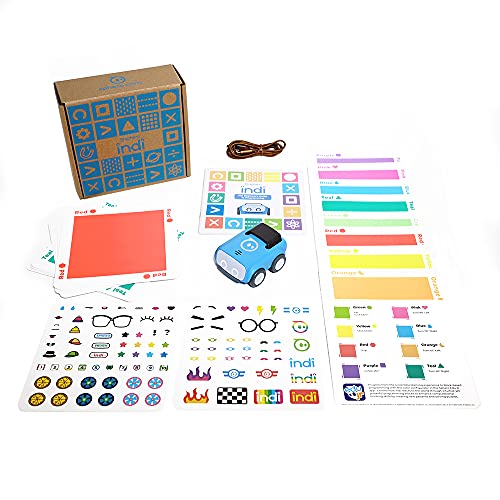
Sphero indi
Best screenless coding robotProgrammed with coloured tiles rather than an app. The robot reads the colour and acts. The way to teach sequencing to a five-year-old without handing them a screen.
Check price on Amazon- Colour-tile programming, no screen needed
- Ages 4-8
- Optional app for older kids
- Genuinely screenless for early years
- Immediate cause-and-effect learning
- Children outgrow it by around age 8
- Tiles get lost

Wonder Workshop Dash
Best robot for classroomsThe most classroom-deployed coding robot there is, largely because the curriculum around it is better than the robot itself. Voice, movement, and sensors driven from a well-designed block app.
Check price on Amazon- Block coding via app
- Voice and sound output
- Ages 6+
- Best supporting curriculum in the category
- Robust enough for shared classroom use
- Requires a tablet per group
- Expensive at classroom quantities
Miko 3
Best kids' companion robotA conversational robot aimed squarely at children, with learning content behind a subscription. Judge it on the content library, because that is what you are really buying.
Check price on Amazon- Conversational voice interaction
- Subscription learning content
- Roams and avoids table edges
- Content library is deep and age-graded
- Kids engage with it far longer than a tablet app
- Content requires an ongoing subscription
- Voice recognition struggles with young children
Makeblock mBot2
Best first coding kitA build-it-yourself coding robot that starts with blocks and moves to Python in the same mBlock software, so it keeps up as the coder grows.
Check price on Amazon- Block coding to Python in mBlock
- Makeblock lists it for age 6+
- Build-it-yourself robot kit

Petoi Bittle
Best small robot dog kitA palm-sized open-source quadruped you assemble yourself. Real gait programming in Arduino or Python at a fraction of the price of a full-size robot dog.
Check price on Amazon- Palm-sized quadruped kit
- Open-source Arduino and Python control
- Pre-assembled option available
- Genuine legged robotics at toy pricing
- Fully open source and hackable
- Small servos wear out with heavy use
- Not a finished consumer product
Eilik Desktop Robot
Best desk companionA small expressive desk robot with no assistant pretensions. It reacts to touch, plays short games, and two of them interact with each other. Bought for personality, not utility.
Check price on Amazon- Expressive animated face
- Touch-responsive
- No voice assistant or cloud account
- Works with no app, account, or subscription
- Genuinely charming animation
- Does not do anything useful
- Short battery life off the stand
Living.ai EMO
Best moving desk robotA palm-sized desk robot that drives around the desktop without falling off, recognises faces, and reacts to touch. Bought for personality on a desk you sit at.
Check price on Amazon- HD camera with face recognition (up to 10 people and objects)
- Touch sensor and 4-microphone array
- Wireless charging skateboard

Joy For All Companion Cat
Best robot pet for seniorsNot a gadget. A therapeutic companion pet used widely in dementia care. It purrs, responds to petting, and needs no charging dock, app, or account.
Check price on Amazon- Battery powered, no app or account
- Responds to petting and motion
- Purr and meow feedback
- Well-evidenced comfort benefit in dementia care
- Nothing to set up or maintain
- No learning or adaptation
- Battery replacement rather than recharging
Bottom Line
Buy Makeblock mBot2 for a child 6 and up. At its limited-time $94.99 it is the cheapest robot gift on this list, and at its $149.99 regular price it stays under $150. This pick changes if Makeblock raises mBot2 past $150. It also changes if Miko adds a free trial of Max to the Miko 3. Pick one of these robot gifts by matching the recipient's age to the table, then order it from the maker page in the sources below while the October 2026 price holds.
See picks sorted by recipient, budget and season across the rest of our robot buying guides.
FAQs
What is a good robot to give as a gift?
Makeblock mBot2 is a good default for anyone 6 and up, listed at a limited-time $94.99 on Makeblock's site in October 2026. For a preschooler, pick Sphero indi ($150.00, Pre-K and up), which codes with color tiles and no screen. For an adult, pick Living.ai EMO ($289) for a desk or Loona (from $499) for the floor. For an older relative, pick the Joy for All Companion Cat ($159.99).
What is a good robot gift for a girl or a boy?
Robots are not made for girls or boys, so pick by the child's interest and age. A child who likes building fits Petoi Bittle (10 and older), sold as a construction kit. A child who likes coding fits Makeblock mBot2 (Age 6+), Wonder Workshop Dash (5 to 14) or Sphero BOLT. For companionship, Miko Mini and Miko 3 are designed for kids 5 to 10 and need Wi-Fi.
What robot gift is best for a 5 year old?
Sphero indi fits a 5-year-old, because Sphero designs it for Pre-K and up and the child codes it with color tiles instead of a screen. Botley 2.0 (5 and up) is also screen-free. Wonder Workshop Dash covers ages 5 to 14. Miko Mini and Miko 3 fit kids 5 to 10 if the home has Wi-Fi, while Makeblock mBot2 starts at Age 6+ and Petoi Bittle at 10 and older.
Do robot gifts need a subscription?
The Miko robots have an optional Max subscription at $99 a year or $14.99 for 30 days, and without it some features are limited or unavailable. KEYi says Loona does not require a mandatory monthly subscription for its core experience, though connected AI services can change. Living.ai publishes no subscription for EMO, and the Joy for All cat runs on included C batteries with no app.
What is a good robot gift under $100?
Makeblock mBot2 is the only pick on this list under $100, at a limited-time price of $94.99 on Makeblock's site in October 2026. That sale price may end, and the regular price is $149.99.
Primary Sources
- Sphero: indi kit (listed price, Pre-K and up age line, color-tile coding)
- Sphero: BOLT (listed price, coding methods, inductive charging base)
- Makeblock: mBot2 (limited-time and regular price, Age 6+, blocks to Python in mBlock)
- Wonder Workshop: Dash (list price, ages 5 to 14, Blockly and Blockly Pro apps)
- Miko: Miko 3 (price, kids 5 to 10, Wi-Fi requirement, battery, privacy, Max subscription)
- Miko: Miko Mini (regular and sale price, sensors, Wi-Fi setup)
- Petoi: Bittle robot dog (price, kit or pre-assembled, age guidance, coding options)
- Living.ai: EMO (camera, face recognition, touch sensor, microphones, charging skateboard)
- Living.ai: shop (EMO White and EMO GO HOME bundle prices)
- Energize Lab: Eilik (DQ and Silver prices, size, weight, battery, touch reactions)
- KEYi Tech: Loona petbot product page (Space Edition price, camera, battery, auto-docking)
- KEYi Tech: Loona price guide (Premium bundle price, themed bundles, subscription statement)
- Joy for All: Companion Cats (price, petting response, C batteries, no app)
- ELEGOO: Smart Robot Car Kit V4.0 (13+ age line, basic electronics requirement)
- LEGO Education: SPIKE Essential product page (set listed as retired)
Still deciding? Our top pick above, the Sphero indi, is the one we'd point you at.