How The Bot Scout Compares the mBot Family
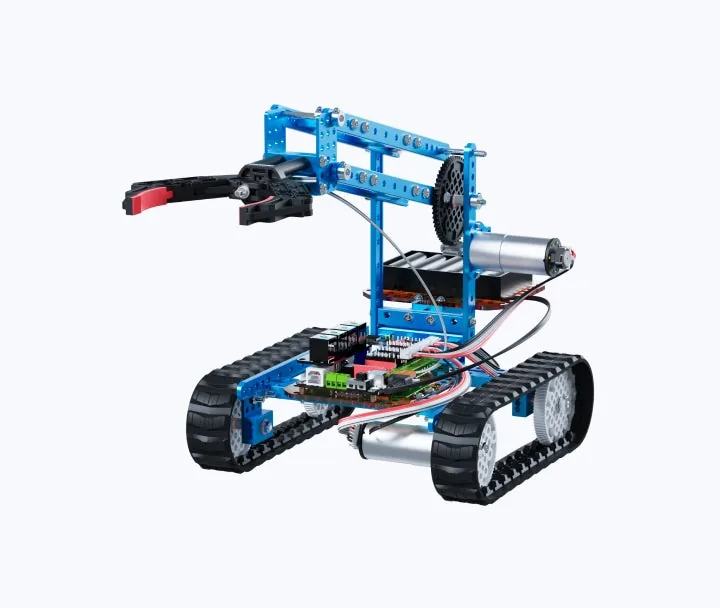
The Makeblock mBot line and the related ZMRobo education kits are marketed as coding robots, but they behave more like classroom platforms with a robot on top. The software that ties them together is mBlock, a Scratch-based editor from Makeblock that adds a Python mode and hardware blocks for each mBot. That software choice, not the plastic and motors, is what most schools are really buying into.
The current models sold on the Makeblock mBot Robot Kits page are the mBot2, mBot Neo, mBot Ranger, and mBot Explorer. ZMRobo, a separate education brand, ships the Loong Series and related kits into many of the same schools. Prices below are taken directly from the vendors' own product pages and their official Amazon storefronts; where a price is only available on request, it is labeled as such.
The Bot Scout view: pick the model that matches the age band and the curriculum you actually plan to teach. A more expensive robot that sits unused because the teacher was not trained is worse than a cheaper one used every week. Departments looking at competing coding-robot platforms before committing to mBot should read the mBot alternatives comparison.
| Model | Recommended age | Coding path | Confirmed retail price | Best classroom fit |
|---|---|---|---|---|
| Makeblock mBot2 | 8+ | mBlock 5 (Scratch, Python, CyberPi) | $149.99 on the Makeblock store | Elementary intro to coding and CS fundamentals |
| Makeblock mBot Neo | 8+ | mBlock 5 (Scratch, Python, AI/IoT) | $179.99 on the Makeblock store | Upper elementary and middle school with AI/IoT units |
| Makeblock mBot Ranger 3-in-1 | 10+ | mBlock 5 (Scratch, Arduino, Python) | $189.99 on the Makeblock store | Middle school STEM, three build modes |
| Makeblock mBot Explorer Kit | 10+ | mBlock 5 (Scratch, Python) | Quote only via Makeblock education sales | Structured classroom kits and competitions |
| ZMRobo Loong Series education kit | 8+ to 14+ per tier | mBlock-compatible, Scratch and Python | Quote only via ZMRobo sales | Districts standardizing multiple grade bands on one vendor |
Makeblock mBot2: The Entry Point Most Elementary Classrooms Actually Need
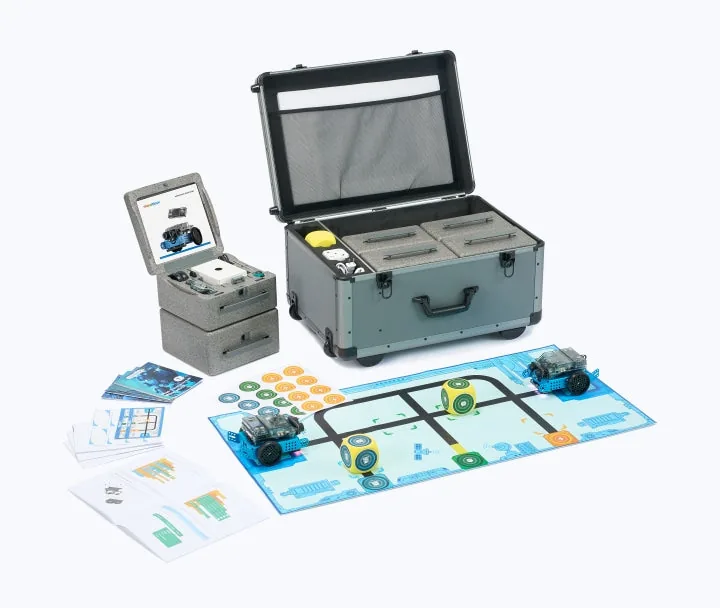
The mBot2 is the successor to the original mBot and is built around the CyberPi controller. The official mBot2 product page lists it at $149.99 and targets ages 8 and up, with block, Scratch, and Python coding through mBlock 5.
On the Makeblock mBot2 Amazon listing the same kit is sold direct by Makeblock, which is the honest reference point when a distributor quote comes in higher. For a single classroom the mBot2 is the model most teachers can adopt without help: line-following and ultrasonic sensing work out of the box, and the CyberPi screen means students can see program output without a laptop tethered to every robot.
The realistic gap is consumables and management. Batteries, spare tires, replacement sensors, and the time to charge 15 robots between periods are the line items that catch first-year adopters.
- Age fit: strongest for grades 3-6 running a first coding unit.
- Software: mBlock 5 in the browser or as a desktop app, no separate account required to open blocks.
- Python path: the same robot supports Python once students outgrow blocks — no second purchase.
- Watch-out: budget for a charging cart or wall of USB-C chargers per class set.
mBot Neo, mBot Ranger, and mBot Explorer: When to Step Up
The mBot Neo product page lists the robot at $179.99 and adds Wi-Fi, a richer sensor set, and AI/IoT lessons on top of the mBot2 baseline. It is the model to pick when the curriculum will actually use image recognition, cloud data, or IoT dashboards — not because it is newer.
The mBot Ranger is a 3-in-1 chassis (tank, racing car, self-balancing) at $189.99 that leans into the physical build side of STEM. It is a better fit for a middle-school class where students spend real time constructing and modifying the platform, not just coding a pre-built rover.
The mBot Explorer Kit is sold through Makeblock's education channel and does not carry a public sticker price; Makeblock Education handles quoting and classroom bundles. Treat it as a structured class-set purchase rather than a hobby buy: the value is in the lesson plans, the curriculum alignment documentation, and the volume discount, not a headline unit price.
| Feature | mBot2 | mBot Neo | mBot Ranger | mBot Explorer Kit |
|---|---|---|---|---|
| Controller | CyberPi | CyberPi with Wi-Fi/AI focus | Auriga (Arduino Mega based) | Class-set bundle, varies |
| Best-known strength | Simple first-coding robot | AI and IoT lessons | 3-in-1 mechanical build | Structured curriculum kits |
| Coding | mBlock 5 blocks and Python | mBlock 5 blocks, Python, AI blocks | mBlock 5 and Arduino IDE | mBlock 5 with teacher materials |
| Public price | $149.99 (Makeblock store) | $179.99 (Makeblock store) | $189.99 (Makeblock store) | Quote via Makeblock Education |
| Weakest for | AI/IoT-heavy units | Deep mechanical builds | Youngest learners | Single-classroom hobby buyers |
ZMRobo Loong Series: The District-Standardization Alternative
ZMRobo is a Shenzhen-based education robotics vendor whose product catalog spans humanoid, wheeled, and construction kits pitched at grades K-12. The Loong Series is the flagship educational line, and ZMRobo positions it as mBlock- and Scratch-compatible with a Python upgrade path, which lines up with the tooling schools already use for mBot.
ZMRobo does not publish per-unit retail pricing; the ZMRobo contact page routes education buyers to a sales quote. That is common for K-12 hardware sold in class sets and district contracts, but it means direct price comparison against a $149.99 mBot2 is not honest without a real quote in hand.
The reason to consider ZMRobo alongside Makeblock is standardization. A district buying for K-2, 3-5, 6-8, and 9-12 at once can sometimes source one vendor across all four bands, which reduces the number of platforms teachers must learn. The reason to be careful: local support, spare parts availability, and lesson-plan quality matter more than a spec sheet, and both should be verified with references before committing.
Classroom Cost Beyond the Robot
Any honest review of an educational robot has to price the classroom, not just the robot. A class set of 15 mBot2 units is $2,249.85 at the $149.99 sticker before tax, shipping, cases, spare parts, or teacher training. That is before mBlock training, cart storage, or the substitute time to send a teacher to a workshop.
The software side is genuinely free: mBlock downloads lists the desktop app for Windows, macOS, ChromeOS, iOS, and Android at no cost, and the browser version runs on managed Chromebooks. That is a real advantage over platforms that gate coding features behind a per-seat license.
The honest budget question is not "which mBot is best" — it is "what will the second-year cost of this class set be?" Batteries and small parts drive that number more than the robot choice.
- Price a full class set, not one robot, when comparing vendors.
- Add USB-C charging infrastructure and a cart or shelving plan.
- Budget spare tires, batteries, and at least one full replacement robot per 10.
- Reserve teacher time — a class set with no trained teacher underperforms a smaller set with one.
Bottom Line
For a single elementary classroom starting coding, the mBot2 at $149.99 is the honest default. Step up to mBot Neo when AI or IoT are actually in the lesson plan, to mBot Ranger when mechanical build time matters, and to the mBot Explorer or ZMRobo Loong quotes when a district is buying at scale and needs curriculum and support wrapped in.
Price the full class set, spare parts, and teacher training before comparing sticker prices between mBot and ZMRobo.
FAQs
What is the difference between the Makeblock mBot2 and mBot Neo?
Both are $149.99 and $179.99 respectively on the Makeblock store and both use mBlock 5 with a Python path. The mBot Neo adds Wi-Fi and an AI/IoT focus, so pick it when the curriculum will actually use those features rather than as a default upgrade.
Which mBot is best for elementary school?
The mBot2 is the strongest fit for grades 3-6. It is the least expensive of the current family, has the simplest first-lesson path in mBlock, and still supports Python later so the school does not need to rebuy hardware.
Is the ZMRobo Loong kit cheaper than Makeblock's mBot?
ZMRobo does not publish per-unit pricing and routes education buyers to a quote through its contact page, so any direct price comparison against the $149.99 mBot2 requires a real quote. ZMRobo's advantage is usually district-wide standardization across grade bands rather than a lower sticker price.
What software do Makeblock mBot robots use?
All current mBot models are programmed in mBlock, Makeblock's Scratch-based editor with a Python mode. mBlock is free on Windows, macOS, ChromeOS, iOS, Android, and the browser, which is why it runs on managed school Chromebooks.
How much does a mBot classroom set actually cost?
A 15-unit mBot2 class set is $2,249.85 at retail before tax, shipping, cases, spare parts, chargers, or teacher training. Second-year cost is usually driven by batteries, tires, and replacement sensors rather than the robots themselves.