Robots For Kids For Sale: Best Categories
Robots for kids for sale range from coding kits to robot pets and novelty toys. Makeblock mBot is a strong beginner coding-kit reference, while the LEGO Education SPIKE Prime retirement notice shows why product lifecycle belongs in the buying decision.
The best robot for a child is one that matches age, patience, reading level, supervision, and privacy expectations. A robot that is too advanced becomes frustrating; one that is too simple becomes boring.
For younger kids, durability and simple controls matter. For older kids, coding depth and project variety matter more — the robotics for beginners guide covers the first-project path for older kids and teens ready to move past preset toys, and the best DIY robot kits for adults page is the honest next step once a teen has outgrown block coding.
If the robot is a present, the robot gift guide sorts picks by recipient and budget, and the best robot toy for a 5, 8, 10 and 12 year old names one pick per age.
| Kid robot type | Best fit | Buyer caution |
|---|---|---|
| Makeblock mBot | Age 6+; $69.99 official listing | Beginner build and block coding |
| Makeblock mBot2 | Age 8+; $149.99 official listing | Block coding through Python |
| LEGO SPIKE Prime | Retired June 30, 2026; app support to 2031 | Use existing kits, not a new long-term purchase |
| ROBOTIS ENGINEER Kit 2 | $885.50 official listing | Older supervised builders and humanoid projects |
Home Robot For Kids Safety
Home robot for kids safety includes more than choking hazards. Buyers should look at cameras, microphones, apps, accounts, batteries, motor strength, and online features.
The FTC children privacy guidance explains that parents control personal data collected by covered online services from children under 13.
Avoid giving a child a robot with unclear recording, chat, or remote-control behavior.
- Check the recommended age range.
- Review app permissions and account requirements.
- Prefer durable parts and protected motors.
- Supervise charging and first setup.
- Disable unnecessary recording or sharing features.
Best Personal Robot For Kids
The best personal robot for kids usually teaches through projects. A toy that only performs preset actions may be fun, but a programmable robot grows with the child.
For a first purchase, choose a robot with a clear parent setup flow, examples, replacement parts, and beginner tutorials.
If the child wants something pet-like, compare the robot pets guide and robot dog guide. If the goal is building, compare robot kits.
If the interest is combat-style toys and arena kits rather than classroom coding, use the BattleBots toys guide and keep it separate from educational competition kits.
Toy-Grade Humanoid Robots vs Research and Enterprise Platforms
Toy-grade humanoid robots and research or enterprise humanoids solve different jobs. WowWee's Robosapien is the clearest toy-grade example. It is a remote-controlled humanoid toy priced under $120, built to walk, gesture, and make sounds on preset commands rather than decide anything on its own.
This toy carries no cameras, no cloud connection, and no autonomy. A child can operate it safely under normal toy-safety rules, with no extra supervision required.
Research and enterprise humanoids are a different category entirely. The Bot Scout's buying guide covers platforms such as Unitree R1, Unitree G1, and 1X NEO. These platforms run onboard sensors, cameras, and AI models, cost thousands of dollars more, and are not built or marketed as children's products.
Do not buy a research or enterprise humanoid as a children's toy. Their cameras, exposed joints, and stronger motors are not designed around child-safety standards the way a toy-grade robot is.
Where To Buy
The models below are the ones we point readers at, listed in the order we would consider them.

Sphero BOLT
Best coding robot overallA programmable rolling ball with an LED matrix and real sensors. The reason it stays on every list is the software: it scales from drag-and-drop blocks to JavaScript on the same hardware.
Check price on Amazon- 8x8 programmable LED matrix
- Gyroscope, accelerometer, compass
- Blocks or JavaScript programming
- Grows with the child from blocks to real code
- Durable and waterproof
- Needs a tablet or phone to do anything
- Battery life is a couple of hours

Botley 2.0
Best screenless robot for ages 5+Programmed entirely with a physical remote. No tablet, no account, no app. The most classroom-proof coding robot for early primary because there is nothing to log into.
Check price on Amazon- Remote-programmed, fully screenless
- Line following and obstacle detection
- Ages 5+
- Zero setup, no app or account
- Hard-wearing for classroom use
- Limited program length
- Outgrown by around age 9
Ozobot Evo
Best paper-and-marker codingFollows lines drawn in marker and reads colour codes as commands, so a sheet of paper becomes the program. Bridges unplugged and screen-based coding better than anything else in the category.
Check price on Amazon- Reads colour codes from drawn lines
- Optional block coding app
- Ages 6+
- Works on paper with no screen at all
- Tiny and genuinely portable
- Small wheels struggle off smooth paper
- Short battery life
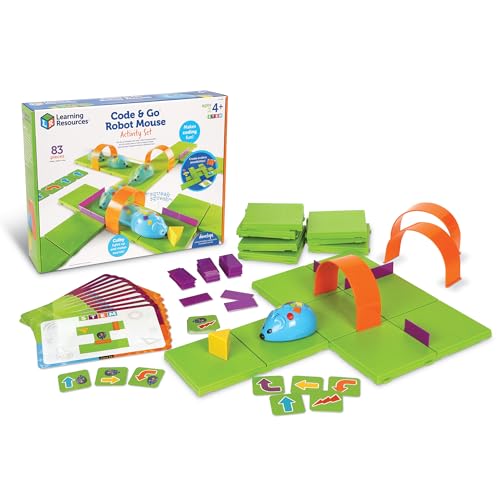
Code & Go Robot Mouse
Best first coding toyButtons on the mouse's back queue a sequence of moves through a maze you build. The cheapest honest introduction to sequencing for a four-year-old.
Check price on Amazon- Button-sequence programming
- Maze grid and cards included
- Ages 4+
- Very inexpensive
- Maze building is half the play value
- Extremely limited program depth
- Short attention span appeal
Miko 3
Best kids' companion robotA conversational robot aimed squarely at children, with learning content behind a subscription. Judge it on the content library, because that is what you are really buying.
Check price on Amazon- Conversational voice interaction
- Subscription learning content
- Roams and avoids table edges
- Content library is deep and age-graded
- Kids engage with it far longer than a tablet app
- Content requires an ongoing subscription
- Voice recognition struggles with young children
Bottom Line
Robots for kids are best when they are safe, durable, supported, and educational. Match the robot to the child's age and supervision needs.
Choose a kid robot by age, privacy, and learning value before price.
FAQs
What is the best robot for kids?
The best robot for kids is usually a durable coding kit or age-appropriate robot with clear instructions and safe app behavior.
Are robots for kids safe?
They can be safe when age-appropriate and supervised, but buyers should check batteries, small parts, motors, apps, and privacy.
Should I buy a humanoid robot for a child?
A small educational humanoid kit can work for older supervised builders, but full humanoid robots are not typical kids' products.
Primary Sources
Still deciding? Our top pick above, the Sphero BOLT, is the one we'd point you at.