Ages 3-5 (Preschool): Screen-Free, Button-Driven Robots
Preschoolers cannot yet read code on a screen, so the best educational robots for this age teach sequencing through buttons or physical tokens. Fisher-Price Code-a-Pillar Twist (about $40) uses rotating dials on each segment to change the path — no app required. Learning Resources Botley 2.0 (about $80) ships with a remote and physical coding cards so a 4-year-old can plan a route before pressing GO.
The Bot Scout screen-time rule for this band is simple: if the robot needs a tablet to work, it is aimed too old. The American Academy of Pediatrics recommends limiting screen use for children under 5 to about an hour a day of high-quality content, so a screen-free robot is a better fit for daily use than a Bluetooth toy tethered to a phone.
KIBO 21 from KinderLab Robotics (about $500) is the classroom standard for this age — children scan wooden blocks to program the robot and there is no screen at all. It is expensive for a single family but common in preschools and libraries.
- Pick screen-free or remote-and-card systems, not tablet-tethered robots.
- Look for large buttons, chunky bodies, and no small parts.
- Expect the child to need an adult for the first three sessions.
Best Robot Toy for a 5, 8, 10 and 12 Year Old
The best robot toy for a 10 year old is the Makeblock mBot2, listed at $94.99 as a limited-time price, down from $149.99, on Makeblock's mBot2 page in October 2026. Makeblock rates it Age 6+, and its mBlock software starts with blocks and moves to Python on the same platform. LEGO Education SPIKE Essential is retired, per LEGO Education's product page, so you should not buy it new.
For a 5 year old, pick the Learning Resources Botley 2.0, which is rated ages 5 and up. A child codes Botley with a remote programmer and coding cards, so it needs no screen. Botley's retail price varies widely between sellers, so compare it with the Check price on Amazon button on this page before you buy. A screen-free alternative is the Sphero indi kit, listed at $150.00 on Sphero's indi page. Children from Pre-K up place color tiles, and the robot follows each one. For an 8 year old, pick Wonder Workshop Dash at its $189.99 manufacturer's suggested retail price (MSRP) on Wonder Workshop's Dash page. Dash is rated ages 5 to 14, and its Blockly Pro app switches between blocks and JavaScript, so a child can move to typed code without buying a new robot.
If your 10 year old wants to build a robot dog, step up to the Petoi Bittle, listed at $349.00 on Petoi's Bittle page. Petoi says Bittle is best for users aged 10 and older. For a 12 year old, pick Sphero BOLT, listed at $179 on Sphero's BOLT page, because a child who has outgrown blocks can program it in JavaScript text code. If your child already owns an mBot2, switch it to Python mode in mBlock before you buy a second robot.
At The Bot Scout, we have not tested these robots, so each pick follows what the maker publishes. Every price above is what the maker listed when we checked in October 2026. Makeblock calls the mBot2 figure a limited-time price, so confirm it on the mBot2 page before you buy. The age-band sections on this page cover each range in more depth, and our Makeblock mBot review and robot gift guide cover the buying decision.
Ages 6-8 (Early Elementary): Block Coding on a Tablet
Once a child can read short words, block coding on a tablet opens up. Sphero indi (about $125) uses color-tile cards for pre-readers and graduates to Sphero Edu block coding for readers — the same robot spans the whole band. Wonder Workshop Dash (about $150) pairs with five free apps that scale from Blockly puzzles to more open projects, and it holds up to years of use.
Ozobot Evo (about $110) is the unusual pick here: it follows lines drawn in marker on paper and reads color codes, so a child can program it with a pen and no device. That makes it a good bridge for families trying to keep screen time low while still building coding intuition.
The honest limitation is battery life and app fatigue. Every robot in this band claims two to three hours of play per charge, but real families report closer to 45 focused minutes before the child moves on. Plan projects, not sessions.
Ages 9-12 (Upper Elementary): Building, Sensors, and Real Projects
This is where educational robots start to look like engineering. LEGO Education SPIKE Essential (about $290) was the standard elementary set until LEGO Education retired it, and SPIKE Prime (about $400) is the upper-elementary and middle-school standard used in the FIRST LEGO League. Both use Scratch-based block coding and have a Python mode for kids who want to keep going.
Makeblock mBot2 (about $130) is the affordable alternative — a real metal-and-motor kit that runs on mBlock (Scratch) and Python, and it is the most common home pick when the family cannot justify LEGO Education pricing. VEX GO (about $200 per kit) is common in elementary classrooms and competes in VEX IQ at the older end of the band.
The screen-time picture flips in this band: the tablet or laptop is now the point. Time in the coding environment counts as active screen time, closer to writing than watching. The failure mode is the opposite of preschool — a robot that only does canned demos and never asks the child to write code. Cheaper alternatives that still teach real coding at this age include micro:bit robot projects, and teachers looking for structured lesson plans should read the DIY robot school projects guide.
Ages 13+ (Middle and High School): Text Code, Real Sensors, Competition
LEGO Mindstorms Robot Inventor (51515, about $360) and VEX IQ or VEX V5 (about $500-$1,200) are the platforms teenagers actually build serious projects on. VEX V5 is the standard for high-school competition robotics and drives most of the VEX Robotics Competition and BEST Robotics events.
Sphero BOLT (about $180) is the pocket-sized option — it teaches JavaScript inside the Sphero Edu app and has real sensors (light, gyro, accelerometer, IR) that support genuine data-collection projects. It is a good gateway for a teenager who is curious about coding but not sold on building a full robot.
FIRST Robotics Competition is the ceiling for this age — high-school teams build 125-pound robots on industrial controllers and compete in regional and world events. Most teams start at the FIRST Tech Challenge level (ages 12-18) before FRC, and both are the honest answer for a teenager who has outgrown consumer kits.
How to Pick Across Ages: The Matrix
The Bot Scout picking rule across the whole span: match the robot to what the child can already do independently, not to what the box says they should be able to do. A confident-reading 5-year-old handles Botley; a reluctant-reading 8-year-old still enjoys Sphero indi color tiles. The matrix below is a starting point, not a rule.
| Age band | Best pick | Teaches | Price range | Screen-time notes |
|---|---|---|---|---|
| 3-5 (Preschool) | Learning Resources Botley 2.0 or Fisher-Price Code-a-Pillar | Sequencing, cause and effect, planning ahead | $40-$80 (KIBO 21 $500 for classrooms) | Screen-free — best fit for AAP under-5 guidance |
| 6-8 (Early Elementary) | Sphero indi or Wonder Workshop Dash | Block coding, loops, conditionals, sensor input | $110-$150 | Tablet-tethered; plan 30-45 minute sessions |
| 9-12 (Upper Elementary) | Makeblock mBot2 (LEGO SPIKE Essential is now retired) | Building, mechanical design, Scratch-to-Python bridge | $94.99-$149.99 | Active screen time in coding environment; counts as making, not watching |
| 13+ (Middle and High) | LEGO Mindstorms Robot Inventor, VEX IQ/V5, or Sphero BOLT | Text-based code (Python, JavaScript), sensors, competition robotics | $180-$1,200 (FRC teams higher) | Comparable to any coding activity; long focused sessions expected |
Common Mistakes When Choosing By Age
The most common mistake is buying up: a 5-year-old is given LEGO SPIKE Prime because it looks impressive, and the box goes back on the shelf. The second most common is buying down: a 12-year-old is given Dash, plays with it for an afternoon, and asks for a Nintendo Switch instead. Age-appropriate is not a marketing bracket, it is a match to reading level, patience, and adult support available.
- Ignore the box age when the child sits between two bands — try the older robot in a store or library first.
- For gifts, prefer robots with free companion apps over subscription-locked platforms.
- Budget for one accessory (extra sensors, spare parts, or a second charger) — not the fanciest kit.
Where To Buy
The models below are the ones we point readers at, listed in the order we would consider them.
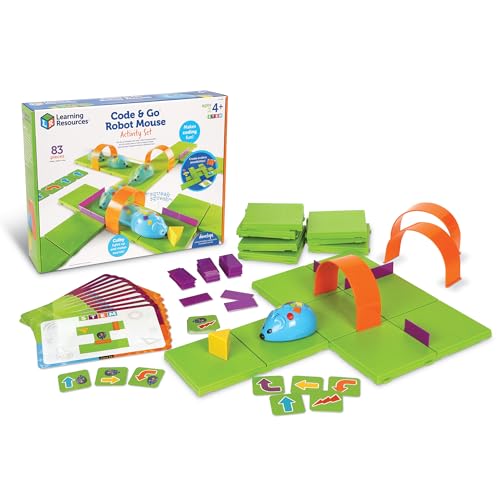
Code & Go Robot Mouse
Best first coding toyButtons on the mouse's back queue a sequence of moves through a maze you build. The cheapest honest introduction to sequencing for a four-year-old.
Check price on Amazon- Button-sequence programming
- Maze grid and cards included
- Ages 4+
- Very inexpensive
- Maze building is half the play value
- Extremely limited program depth
- Short attention span appeal

Botley 2.0
Best screenless robot for ages 5+Programmed entirely with a physical remote. No tablet, no account, no app. The most classroom-proof coding robot for early primary because there is nothing to log into.
Check price on Amazon- Remote-programmed, fully screenless
- Line following and obstacle detection
- Ages 5+
- Zero setup, no app or account
- Hard-wearing for classroom use
- Limited program length
- Outgrown by around age 9
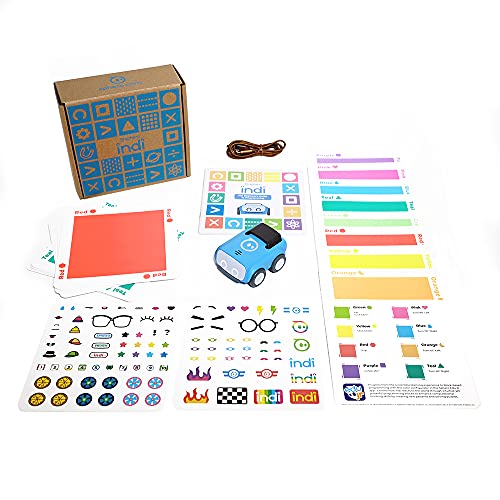
Sphero indi
Best screenless coding robotProgrammed with coloured tiles rather than an app. The robot reads the colour and acts. The way to teach sequencing to a five-year-old without handing them a screen.
Check price on Amazon- Colour-tile programming, no screen needed
- Ages 4-8
- Optional app for older kids
- Genuinely screenless for early years
- Immediate cause-and-effect learning
- Children outgrow it by around age 8
- Tiles get lost

Sphero BOLT
Best coding robot overallA programmable rolling ball with an LED matrix and real sensors. The reason it stays on every list is the software: it scales from drag-and-drop blocks to JavaScript on the same hardware.
Check price on Amazon- 8x8 programmable LED matrix
- Gyroscope, accelerometer, compass
- Blocks or JavaScript programming
- Grows with the child from blocks to real code
- Durable and waterproof
- Needs a tablet or phone to do anything
- Battery life is a couple of hours

Makeblock mBot
Best buildable coding robotYou build this one before you code it. An Arduino-compatible board under a metal chassis means it stays useful long after the block-coding phase ends.
Check price on Amazon- Arduino-compatible mainboard
- Metal build-it-yourself chassis
- Scratch-based and Arduino coding
- Building is half the lesson
- Real Arduino path for older students
- Assembly needed before first use
- Fiddly for under-8s
Bottom Line
Educational robots by age is really a question of reading level and adult support. Screen-free tokens for preschool, block coding on a tablet for early elementary, real building and sensors for upper elementary, and text code plus competition platforms for teenagers.
Match the robot to what the child can already do independently, and prefer platforms with free companion apps and long support windows.
FAQs
What is the best robot toy for a 10 year old?
The best robot toy for a 10 year old is the Makeblock mBot2, listed at $94.99 as a limited-time price, down from $149.99, on Makeblock's site in October 2026. Makeblock rates it Age 6+, and its mBlock software moves a child from blocks to Python. For a child who wants to build a robot dog, Petoi listed the Bittle at $349.00 in October 2026 and says it is best for ages 10 and older.
What is the best educational robot for a 5 year old?
Learning Resources Botley 2.0 (about $80) is the common pick for a 5-year-old — it uses a remote and physical coding cards, needs no tablet, and teaches sequencing. Fisher-Price Code-a-Pillar Twist is a cheaper option for a younger 3-4 year old.
What is a good educational robot for toddlers?
For toddlers (roughly 3-4), Fisher-Price Code-a-Pillar Twist is the honest recommendation — it is screen-free, uses rotating dials, and has no small parts. Most other 'educational robots' are aimed at 5+ and will frustrate a toddler.
When should a child move from block coding to text coding?
Around ages 11-13, once the child is comfortable writing multi-step block programs and asks 'can I make it do more than this'. Sphero BOLT and LEGO SPIKE Prime both offer a Scratch-to-Python bridge that makes the switch gradual rather than sudden.
Are educational robots worth the price?
A well-matched robot ($100-$300) that gets used weekly for a year is worth it; a mis-matched one at any price is not. The best predictor of value is whether an adult in the house will sit with the child for the first three sessions.
Which educational robot is best for the classroom versus home?
Classrooms favor KIBO 21, LEGO SPIKE, and VEX GO/IQ because they scale to multiple kids and have curriculum. Homes favor Botley, Dash, Sphero indi/BOLT, and mBot2 because they are cheaper, self-contained, and forgive being left in a bin.
Primary Sources
Still deciding? Our top pick above, the Code & Go Robot Mouse, is the one we'd point you at.