Choose by the Interaction You Want
Choose an artificial intelligence (AI) companion app for portable conversation. Choose a robot when physical interaction in a room is part of the goal. Our comparison uses published features from Replika, Kindroid, Nomi, and Loona, rather than hands-on product use.
For adult conversation on a phone or computer, an app avoids the need to buy a separate robot body. Replika describes calls and conversation, while Kindroid advertises text, voice, and video calls. The available features can depend on the service and subscription.
Loona offers a different kind of interaction. It is a pet-like robot with wheels, sensors, and a camera, so its physical presence can be part of an activity in a shared room. Its product page also advertises chat, but that does not make it a substitute for every app feature.
The app-first recommendation changes if you want a device to move or react physically in the room. If you only want text or voice while away from home, start with an app and leave the hardware purchase aside.
AI Companion Apps vs Robots by Requirement
The choice between an app and a robot starts with conversation, physical movement, and service dependence as separate requirements. A robot body adds hardware to the conversation decision. It does not establish that replies are generated offline.
Use the table to decide which capabilities belong on your purchase list. The comparison uses published features and does not measure conversation quality.
A virtual companion app can provide a character and an interface without a robot body. Loona can move in a room, but a buyer seeking a particular character or call feature should evaluate that requirement separately.
Neither category guarantees access after a subscription ends. Kindroid gives a documented example of read-only account access after expiry, but that rule should not be assumed for other services.
| Requirement | Companion app | Physical companion robot |
|---|---|---|
| Conversation | Text and voice options vary by app and tier | Loona advertises chat alongside physical interaction |
| Portability | Conversation on a phone or computer | Interaction with the robot body in its location |
| Movement | An app alone cannot move through a room | Loona uses wheels for physical movement |
| Upkeep | Account and service terms remain relevant | Hardware adds charging space and potential repair costs |
| Service dependence | Kindroid says servers process messages | A physical body does not establish offline chat |
| Choice | Start here for conversation away from home | Consider hardware for shared-room movement or reactions |
Conversation Features Without a Robot Body
Companion apps offer different ways to shape adult conversation without buying a robot. Replika describes conversation, memory, appearance customization, calls, and selfies on its homepage.
Replika is available on iOS and Android. Its Pro help page describes voice messages and background calls among the subscription features. Do not assume that every advertised feature is included on every tier.
Kindroid advertises text, voice, and video calls, along with roles such as a creative co-writer or language partner. Its personality documentation describes a character's name, avatar, personality, and greeting. The greeting establishes a tone and style for the character.
Kindroid also describes optional Key Memories, Response Directives, and Example Messages. You could enter a fictional preference for a character and later ask about it, but the published controls do not guarantee perfect recall or compliance with an instruction.
Nomi advertises custom backstory and preferences, voice chats, hands-free calls, optional proactive messages, and group chats with multiple characters. It also describes sharing images and links for discussion. Nomi says it is free to start, but the checked source does not establish current paid feature limits.
Choose the communication mode before choosing a character. If you want hands-free calls, compare the documented call features. If you want private text conversation while traveling, a moving robot body is unnecessary.
Physical Presence With Loona
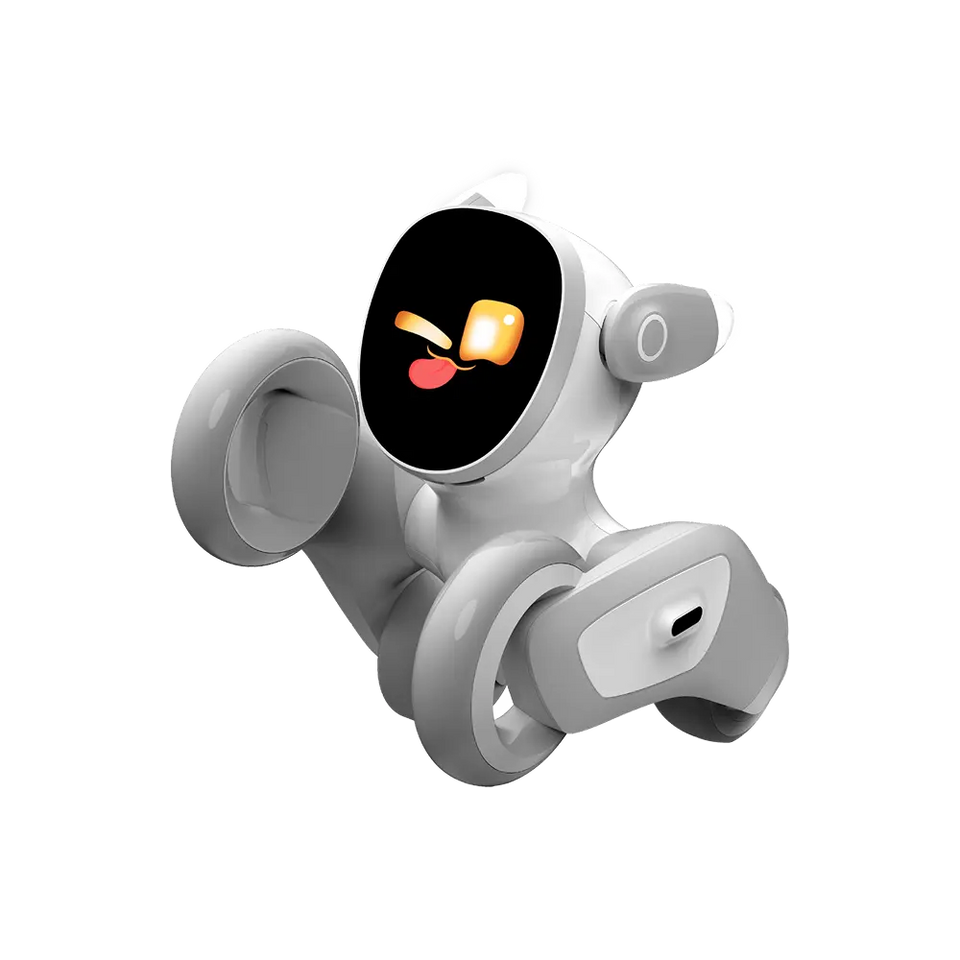
Loona is a pet-like physical robot from KEYi Tech, with wheels for movement and sensors for interaction in a room.
The Loona product page lists obstacle and environment sensing, facial recognition, touch sensors, a microphone, and a speaker. Those features offer ways to interact with a physical device rather than only with a character on a screen. The listed facial recognition feature does not establish its accuracy or anyone's consent to be recognized.
Loona also has a camera, Wi-Fi, a rechargeable battery, and dock options. Its product page describes remote monitoring, so camera and microphone controls need to fit the people sharing the room. Agree on when those features may be used before placing Loona in a shared space.
The product page advertises games and chat. Loona's pet-like movement gives you a physical interaction option, but its published features do not establish that it can perform household chores or connect to an arbitrary companion app.
For a movement-based activity, allow suitable floor and charging space. For fictional conversation on a phone, a separate robot body is unnecessary.
Compare other physical formats in the companion robots guide or look at desktop companion robots.
Cloud Dependence Is a Separate Decision
A robot's physical body does not prove that its conversation features work offline. Kindroid says in its official FAQ that servers process messages to generate replies.
For an app, separate the ability to read an existing conversation from the ability to send a new message. Kindroid says an account becomes read-only after subscription expiry or free-preview exhaustion. Chats and media can still be read, exported, or deleted, but sending messages and making calls require an active subscription or trial.
That Kindroid example does not establish the cancellation terms for Replika, Nomi, or Loona. Loona's product page does not establish an always-offline chat mode. If offline conversation is a requirement, leave Loona off the purchase list unless the relevant terms support that use.
An avatar also does not establish device control. Replika's virtual-assistant help page says Replika cannot control external device apps. It also says reminders, calculations, and live information are not reliable uses for Replika.
A saved memory has a narrower purpose than automation. Kindroid describes Key Memories as a place for enduring facts, while its Response Directive can influence replies. Neither feature establishes that a character can operate a robot or transfer memories to another service.
If your intended use requires both conversation and physical movement, treat robot compatibility as its own purchase requirement. A voice call or an expressive avatar alone does not establish that connection.
Costs for AI Companion Apps vs Robots
A robot purchase can add hardware and potential repair costs to the service decision. An app-only choice avoids buying a dedicated robot body, though app features may require a subscription.
Use product pages such as Kindroid's and the actual checkout before committing to a billing period.
The cost of losing a feature can also affect the decision. Kindroid's documented read-only state preserves access to existing chats and media, but sending new messages and making calls require a subscription or trial. That is a specific Kindroid term, not a promise about other apps.
Set a spending limit before choosing hardware, then decide whether movement is worth a separate purchase for your intended activity. If you only need an occasional text conversation, start by comparing app terms rather than adding a robot body.
Before committing, use the Kindroid FAQ, Replika Pro help page, or Nomi homepage alongside the relevant checkout to review the features and billing terms offered to you. Choose no purchase if the available terms do not meet your spending limit.
- List the text, voice, or video features you want before selecting a tier.
- Set a spending limit that includes any robot hardware and potential repairs.
- Review the billing period, renewal terms, and cancellation instructions at the relevant checkout alongside the Kindroid FAQ.
- Decide whether access to old chats or an export is important after cancellation.
A Trial Plan Before Buying Hardware
A small, fictional conversation exercise can help you decide which app controls you want before buying a robot. This is a proposed exercise, not a report of product testing or a promise about the result.
Kindroid's personality documentation describes Key Memories and Response Directives that you can use to shape a character. Use the exercise to decide whether those controls suit you. An edited instruction does not guarantee a particular reply.
After the exercise, write down the interaction you still want. If the missing requirement is movement or a physical reaction in a room, compare robots. If the missing requirement is a particular conversation mode, compare the app features and tiers that offer it.
- Choose a harmless fictional character and an ordinary job, such as a creative co-writer. Pick text or voice as the communication mode, then use the same ordinary question when comparing the conversation features available to you.
- Add an invented preference, such as a character's favorite fictional setting. Discuss another topic, then ask the character to recall the preference. Correct the invented preference and observe whether a later reply uses the correction.
- Keep the exercise free of sensitive inputs. Invent names and details rather than entering health records, workplace secrets, or other people's photographs.
Account and Data Controls
Kindroid distinguishes cancellation, account deletion, and chat deletion. Decide which action you need before removing an app or ending a subscription.
Kindroid's FAQ says deleting an account does not cancel the subscription. Cancel payment through the relevant documented service or store controls, and use the account deletion process separately if you also want to remove the account.
Kindroid's FAQ says Rewind removes recent messages. Older messages cannot be deleted individually through that control. Deleting a message, deleting a character, and deleting an account are different actions. The checked information does not establish that every backup disappears immediately.
Nomi's privacy policy says account deletion can be requested through Account Settings. It describes deletion of personal information within about 28 days after confirmation, with exceptions for some training or communication archives and legally retained information.
Those examples describe individual policies, not a ranking of app security. If retaining a copy of a conversation matters to you, compare the export and deletion controls in the Kindroid FAQ or the applicable service documentation before entering personal material.
For Loona, camera and microphone use adds a shared-room decision. Discuss those controls with the people who use the room, and review the Loona product information for the features relevant to your purchase.
Who Should Choose Neither
Neither an app nor a companion robot is established here as a substitute for human care, emergency help, or a real relationship. Contact the appropriate person or service when that is the need.
A buyer who needs reliable reminders, calculations, or live information should not choose Replika on the assumption that it performs those jobs. Replika's assistant help page describes those uses as unreliable.
You can also choose neither when the available privacy controls, service terms, or spending limit do not fit. Keep the intended conversation or activity on your list and wait until the documented features and terms support it.
These comparisons concern adult conversation. A pet-like body or a fictional character does not change the need to choose a product for the intended adult user and setting.
The Smallest Device for the Job
An app is the starting point for adult text or voice conversation on a phone or computer. A physical robot becomes worth considering when its movement or shared-room interaction is part of the activity you want.
The distinction does not settle every purchase question. Kindroid's server processing and account-access terms show why an app's conversation features and service dependence must be considered separately. Loona's camera and microphone add room-sharing decisions that an app-only purchase may not address in the same way.
Your Next Step
If you decide that an app fits, move to the virtual companion app guide to consider character setup and controls. If physical presence remains a requirement, use the robot companion guide to compare the type of device with the interaction you want.
FAQs
Can an AI companion app control a robot?
An app's voice or avatar features do not establish robot compatibility. Replika's help page says Replika cannot control external device apps. Treat control of a particular robot as a separate requirement.
Do companion robots work offline?
A physical robot does not necessarily provide offline conversation. The checked Loona product information does not establish an always-offline chat mode. Kindroid says its servers process messages, but that statement applies to Kindroid rather than every companion product.
Can a companion robot replace a person?
A companion robot is not established as a replacement for a person, human care, or emergency help. Seek the appropriate person or service when that is the need.