Run the Transfer Test
Coding robots make programming physical, which is genuinely motivating. Sphero publishes a sealed ladder from ages 4+ through 14+, and Makeblock mBot pairs coding with a buildable platform.
The Bot Scout transfer test is the question that decides value: if the robot were removed tomorrow, what could the student still do. A platform that teaches sequencing, conditionals, loops, variables, and debugging builds skill that outlives the hardware; one that teaches a proprietary drag-and-drop interface builds familiarity with an interface.
The clearest signal is whether the environment shows the text equivalent of a block program. Students who can see the same logic in two representations move between them; students who only ever see blocks hit a wall the first time they meet real syntax.
| Concept | Teachable on a coding robot | What makes it stick | Warning sign |
|---|---|---|---|
| Sequencing | Yes, immediately | Physical, visible consequences | Nothing beyond driving |
| Loops and conditionals | Yes | Sensor input drives the branch | Only timed delays used |
| Variables and state | Yes, at the right band | Values shown and reused | Numbers hardcoded everywhere |
| Debugging | Yes, and best here | Wrong behaviour is visible | Errors hidden by the interface |
| Text-based syntax | Only on some platforms | Block-to-text view of the same program | Blocks only, no text path |
Match the Platform to the Band
Age fit is published for most platforms and worth following. Sphero lists indi for ages 4+ and grades PK–3, Mini for ages 5+, BOLT+ for ages 8+ and grades 3–10, and RVR+ for ages 11+ — the ladder mapped in the Sphero guide.
A buildable platform adds construction alongside programming, which suits a class whose outcome is engineering rather than code. Compare formats in the STEM robotics kits guide.
Debugging is the most valuable thing a coding robot teaches and the most often skipped. A robot that drives into a wall gives immediate, unambiguous feedback that a screen program does not, and a lesson designed around deliberate failure uses that better than one designed around success.
- Ask what a student can still do if the robot is removed.
- Prefer environments that show the text equivalent of blocks.
- Design at least one lesson around deliberate debugging.
- Match the platform to the published age and grade band.
- Confirm a next-band path exists before standardising.
Classroom Practicalities
Fleet logistics decide whether a coding robot is used twice or twenty times: charging, storage, device pairing across a full class, and the reset time between two back-to-back periods.
Review student accounts, data retention, deletion, and what still works offline before rollout, and confirm who maintains the lesson library next year — the durability point in the Sphero EDU guide.
For the full fleet arithmetic including spares, see the education robots guide. One failed unit stops a group, not a student.
Where To Buy
The models below are the ones we point readers at, listed in the order we would consider them.

Sphero BOLT
Best coding robot overallA programmable rolling ball with an LED matrix and real sensors. The reason it stays on every list is the software: it scales from drag-and-drop blocks to JavaScript on the same hardware.
Check price on Amazon- 8x8 programmable LED matrix
- Gyroscope, accelerometer, compass
- Blocks or JavaScript programming
- Grows with the child from blocks to real code
- Durable and waterproof
- Needs a tablet or phone to do anything
- Battery life is a couple of hours

Botley 2.0
Best screenless robot for ages 5+Programmed entirely with a physical remote. No tablet, no account, no app. The most classroom-proof coding robot for early primary because there is nothing to log into.
Check price on Amazon- Remote-programmed, fully screenless
- Line following and obstacle detection
- Ages 5+
- Zero setup, no app or account
- Hard-wearing for classroom use
- Limited program length
- Outgrown by around age 9
Ozobot Evo
Best paper-and-marker codingFollows lines drawn in marker and reads colour codes as commands, so a sheet of paper becomes the program. Bridges unplugged and screen-based coding better than anything else in the category.
Check price on Amazon- Reads colour codes from drawn lines
- Optional block coding app
- Ages 6+
- Works on paper with no screen at all
- Tiny and genuinely portable
- Small wheels struggle off smooth paper
- Short battery life

Wonder Workshop Dash
Best robot for classroomsThe most classroom-deployed coding robot there is, largely because the curriculum around it is better than the robot itself. Voice, movement, and sensors driven from a well-designed block app.
Check price on Amazon- Block coding via app
- Voice and sound output
- Ages 6+
- Best supporting curriculum in the category
- Robust enough for shared classroom use
- Requires a tablet per group
- Expensive at classroom quantities
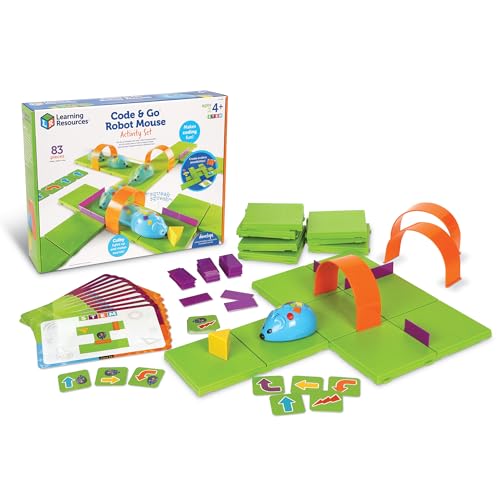
Code & Go Robot Mouse
Best first coding toyButtons on the mouse's back queue a sequence of moves through a maze you build. The cheapest honest introduction to sequencing for a four-year-old.
Check price on Amazon- Button-sequence programming
- Maze grid and cards included
- Ages 4+
- Very inexpensive
- Maze building is half the play value
- Extremely limited program depth
- Short attention span appeal
Bottom Line
A coding robot earns its place when the concepts survive the hardware. Prefer platforms with a visible block-to-text path, design for debugging, and plan the fleet before the lesson.
Ask what a student could still do if the robot were removed, then choose the platform that answers best.
FAQs
Do coding robots teach real programming?
They can, if the platform teaches sequencing, conditionals, loops, variables, and debugging. A platform that only teaches its own drag-and-drop interface builds familiarity rather than skill.
What age should a child start with a coding robot?
Published bands are a good guide. Sphero lists indi for ages 4+ and grades PK–3 and Mini for ages 5+, with sensor-focused platforms from around age 8.
Are block-based coding robots a dead end?
Not if the environment shows the text equivalent of the same program. Seeing one logic in two representations is what lets students move to real syntax later.
What is the most valuable skill a coding robot teaches?
Debugging. A robot that drives into a wall gives immediate, unambiguous feedback, and lessons designed around deliberate failure exploit that better than lessons designed around success.
Primary Sources
Still deciding? Our top pick above, the Sphero BOLT, is the one we'd point you at.