Run the Grade-Band Test First
Sphero publishes its lineup as an age and grade ladder rather than a good-better-best price ladder: indi for ages 4+ and grades PK–3, Mini for ages 5+ and grades 2–6, Snap and littleBits for ages 8+, BOLT+ for ages 8+ and grades 3–10, RVR+ for ages 11+ and grades 6–12, and the Blueprint Engineering and Blueprint Robotics kits for ages 14+ in secondary programs.
The Bot Scout grade-band test asks two questions before any purchase order: which band does this class actually sit in today, and who resets the fleet between two back-to-back periods. A robot one band above a class turns a lesson into troubleshooting, and a robot one band below turns it into a toy demonstration.
The non-obvious constraint is not the robot at all. It is the 6 minutes between periods. A platform that needs individual account logins, a firmware check, or a charge swap in that window will be used once and then live in a cupboard, regardless of how good the curriculum is. The main competitors to weigh against the Sphero ladder are Makeblock, which adds buildable hardware, and VEX Robotics, which spans classroom to competition.
| Sphero platform | Published band | Best classroom use | What to verify before ordering |
|---|---|---|---|
| indi | Ages 4+, grades PK–3 | Screen-free sequencing with colour cards | Storage, card sets, and floor space per group |
| Mini | Ages 5+, grades 2–6 | First driving and block coding | Device pairing limits in a full class |
| Snap and littleBits | Ages 8+, grades 2–7 | Build-and-invent electronics projects | Consumable and small-part replacement |
| BOLT+ | Ages 8+, grades 3–10 | Sensors, data, and block-to-text progression | Charging cradles and per-period reset time |
| RVR+ | Ages 11+, grades 6–12 | Programmable rover with expansion | Add-on hardware and terrain in the room |
| Blueprint Engineering and Robotics | Ages 14+, grades 6–12 and 8–12 | Secondary engineering and robotics courses | Teacher training and curriculum alignment |
Buying a Sphero Fleet, Not a Sphero Robot
A classroom order is a fleet order. Budget the student-to-robot ratio, shared spares, charging and storage, the devices that drive the robots, account management, and the replacement parts that will be needed by the second term.
One failed unit does not cost one robot; it stops a group of students for a period. Carrying two spares across a fleet is usually cheaper than the lost instructional time, which is the same fleet logic covered in the education robots guide.
For a cross-brand comparison, use the STEM robotics kits guide, and check Sphero alternatives if the curriculum needs a buildable platform rather than a sealed one.
- Set the student-to-robot ratio from the lesson design, not the budget line.
- Order spares at fleet scale so one failure does not stop a group.
- Confirm charging, storage, and per-period reset time in the actual room.
- Check account, login, and data-retention requirements for students.
- Verify the upgrade path to the next grade band before standardising.
Privacy and Progression Are the Two Long-Term Risks
Review student accounts, any camera or microphone use, cloud storage, data retention, deletion, and take-home policy before deployment. Classroom convenience does not override student-privacy obligations, and a platform that requires unnecessary personal data is a poor fit whatever it teaches.
The progression risk is quieter. A sealed robot that only accepts block coding is correct for a first band and a dead end for a class that should be moving toward text-based programming; compare the specific model guides for Sphero BOLT and Sphero EDU before standardising a whole department on one tier.
Buy the band the class is in now, and confirm the next band exists on the same curriculum before treating the purchase as a multi-year standard.
Where To Buy
The models below are the ones we point readers at, listed in the order we would consider them.

Sphero BOLT
Best coding robot overallA programmable rolling ball with an LED matrix and real sensors. The reason it stays on every list is the software: it scales from drag-and-drop blocks to JavaScript on the same hardware.
Check price on Amazon- 8x8 programmable LED matrix
- Gyroscope, accelerometer, compass
- Blocks or JavaScript programming
- Grows with the child from blocks to real code
- Durable and waterproof
- Needs a tablet or phone to do anything
- Battery life is a couple of hours
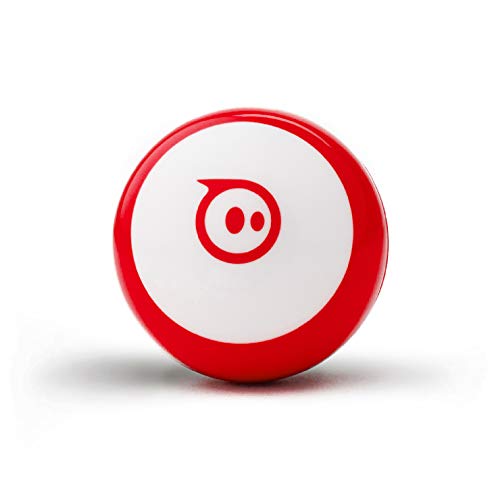
Sphero Mini
Cheapest way into SpheroThe BOLT's software on a golf-ball-sized body without the LED matrix or advanced sensors. The right entry point if you want to test whether coding robots land with your kid.
Check price on Amazon- Golf-ball sized
- Same Sphero Edu app
- No LED matrix
- Very low cost of entry
- Full access to the Sphero Edu curriculum
- No sensor projects
- Too small for classroom demos
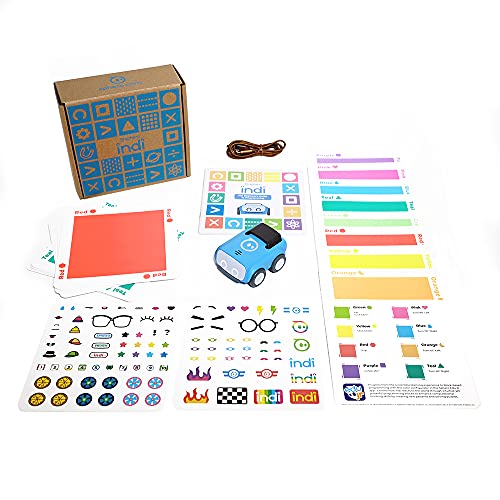
Sphero indi
Best screenless coding robotProgrammed with coloured tiles rather than an app. The robot reads the colour and acts. The way to teach sequencing to a five-year-old without handing them a screen.
Check price on Amazon- Colour-tile programming, no screen needed
- Ages 4-8
- Optional app for older kids
- Genuinely screenless for early years
- Immediate cause-and-effect learning
- Children outgrow it by around age 8
- Tiles get lost
Bottom Line
Sphero is a grade-banded ladder, so the right purchase is the band the class occupies today with a verified path to the next one. Price the fleet, the reset time, and the spares rather than the individual robot.
Identify the grade band, time the between-period reset, then price a fleet with spares instead of a single unit.
FAQs
Which Sphero robot is right for elementary students?
Sphero publishes indi for ages 4+ and grades PK–3 and Mini for ages 5+ and grades 2–6. Both target early sequencing and first driving rather than text-based programming.
What is the difference between Sphero BOLT+ and RVR+?
Sphero lists BOLT+ for ages 8+ and grades 3–10 with sensor and data work, and RVR+ for ages 11+ and grades 6–12 as a programmable rover with expansion capability for older students.
How many Sphero robots does a classroom need?
Set the number from the lesson design and group size, then add shared spares. One failed unit stops a whole group for the period, so spares are usually cheaper than the lost instructional time.
What should schools check before buying Sphero robots?
Check the grade band, between-period reset time, charging and storage, student account and data-retention requirements, spare parts, and whether a next-band platform exists on the same curriculum.
Primary Sources
Still deciding? Our top pick above, the Sphero BOLT, is the one we'd point you at.