What a Raspberry Pi Kit Should Do That an Arduino Cannot
A Raspberry Pi robot kit is worth its premium when the build uses the Pi for camera vision, network control, or ROS. If the kit only reads a distance sensor and turns two motors, an Arduino does the same job for a third of the price.
The Bot Scout Pi kit test asks whether the kit ships a camera module, whether it supports ROS or ROS 2, and whether the Python code is written for the current Bookworm OS. A kit that fails all three is an Arduino build wearing a Pi hat.
The other honest constraint is boot time. A Pi takes 20-40 seconds to boot; an Arduino runs the second it gets power. If a robot needs to react in under a second on startup, the Arduino stays.
| Kit | Chassis | Camera included | ROS support | Approx. price (USD) |
|---|---|---|---|---|
| Modular Robotics GoPiGo3 | Wheeled (2WD) | Optional Pi Camera | Community ROS packages | $140-190 |
| SunFounder PiCar-X | Wheeled (Ackermann) | Yes, pan-tilt | Python native | $130-160 |
| Waveshare JetRacer / PiRacer | Wheeled (RC car) | Yes, wide-angle | Yes (JetRacer variant) | $200-350 |
| Freenove Big Hexapod for Pi | Crawler (6-leg) | Yes, pan-tilt | Python native | $200-260 |
| Adeept RaspTank | Crawler (tracked) | Yes, pan-tilt | Python native | $120-160 |
| Waveshare AlphaBot2 | Wheeled (2WD) | Optional | Community only | $100-140 |
Wheeled vs Crawler Chassis
Wheeled kits are faster, simpler, and easier to write control code for. Crawler kits (hexapods, tracked tanks) are slower and heavier, but they teach inverse kinematics and traverse surfaces that stall a 2WD car.
The Freenove Big Hexapod is the most complete hexapod-for-Pi build under $300 and includes an 18-servo body, an ultrasonic sensor on a pan-tilt head, and a Python control app. Assembly is 6-10 hours.
For RC-style racing, the Waveshare PiRacer Pro AI Kit is designed for the DonkeyCar and NVIDIA-Jetson tutorial track. If autonomous driving is the goal, price the Jetson variant covered in the Raspberry Pi vs Jetson Nano comparison.
Camera and Vision Setup
A Pi robot without a camera is throwing away the Pi. Every kit above either ships a camera or accepts the standard Raspberry Pi Camera Module 3. Confirm before ordering.
OpenCV runs on any Pi 4 or Pi 5. Real-time object detection at 15+ FPS wants a Pi 5 or a Coral USB Accelerator. A Pi 3 will run OpenCV but will chug on anything more than color-blob tracking.
The Pan-tilt kit ships with two SG90 servos on almost every camera-equipped robot listed. Those servos are the first thing that fails in heavy classroom use; keep two spares per fleet.
- Pi Camera Module 3 for wide field of view and autofocus.
- USB webcam if you need a longer cable or a lens the CSI camera does not offer.
- Coral USB Accelerator if you want on-device TensorFlow Lite inference above 30 FPS.
- Two spare SG90 servos per pan-tilt head, per robot, in any classroom deployment.
ROS, Python, and Software Stack
Native ROS 2 support is thinner on the Pi side than most vendors admit. Community packages exist for the GoPiGo3 and the AlphaBot2, but the manufacturer stack is Python-first almost everywhere. See the Arduino vs Raspberry Pi comparison for where each side actually earns its keep.
If ROS is a hard requirement, buy the JetRacer instead of the PiRacer, or build on a Pi 5 with the ROS 2 Iron installer and expect a weekend of setup. Do not assume a Pi kit is ROS-ready because a forum post says so.
For Python-only projects, the SunFounder PiCar-X docs are the cleanest first-party set on this list. The API is thin enough to learn in an afternoon.
What to Verify Before You Order
Confirm the kit works with the Pi you actually own. A kit written for the Pi 4 may need a firmware patch on a Pi 5, and a kit that assumes 3.3V logic will not accept a 5V sensor without a level shifter.
Confirm the battery type. 18650 cells are cheap and rechargeable; AA cells sag under load; LiPo packs need a charger you may not own.
Compare against the Arduino kit lineup before committing. If the answer to "what does the Pi do here" is nothing the Arduino cannot, save the money.
Where To Buy
The models below are the ones we point readers at, listed in the order we would consider them.
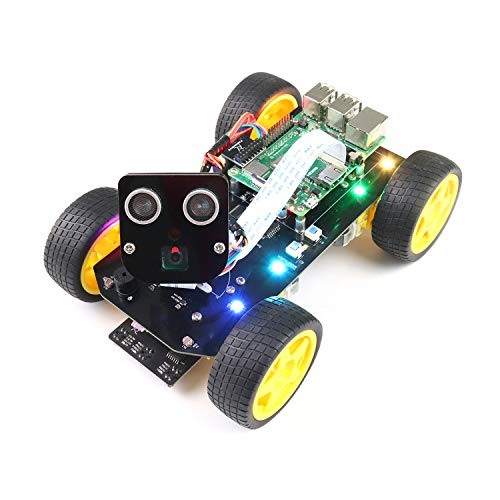
Freenove 4WD Car Kit
Best Raspberry Pi robot kitA Pi-based rover with a camera on a servo mount, so it is a vision project from day one rather than a line-follower you later try to upgrade.
Check price on Amazon- Raspberry Pi based (Pi not included)
- Camera on pan-tilt servos
- Python tutorials included
- Camera and vision from the start
- Well-documented Python codebase
- Raspberry Pi sold separately
- Assembly is involved

SunFounder PiCar-X
Best self-driving learner kitA Pi rover built specifically around the self-driving lesson plan: lane following, obstacle avoidance, and object tracking with the vision code already written.
Check price on Amazon- Raspberry Pi based (Pi not included)
- Camera on pan-tilt mount
- Lane and object tracking examples
- Self-driving projects work out of the box
- Clear, structured tutorials
- Raspberry Pi sold separately
- Servos are entry-grade

Freenove Hexapod Robot Kit
Best walking robot kitEighteen servos and real gait code. The cheapest way to work on legged locomotion rather than wheels. A serious build, not a weekend project.
Check price on Amazon- Six legs, 18 servos
- Raspberry Pi based (Pi not included)
- Gait control code included
- Genuine legged-locomotion learning
- Far cheaper than any commercial walker
- Long, demanding assembly
- Servo calibration is fiddly

Raspberry Pi 5
Best board for robot visionA full Linux computer, which is what you want the moment your robot needs cameras, ROS, or on-board vision. Overkill and power-hungry for simple motor control.
Check price on Amazon- Quad-core Arm CPU, up to 16GB RAM
- Runs full Linux and ROS 2
- Dual camera connectors
- Handles vision and ROS workloads
- Enormous community and library support
- Needs real power budget and cooling
- No real-time pin control without a helper board
Bottom Line
A Raspberry Pi robot kit is worth the premium for camera, ROS, or Python. Pick the SunFounder PiCar-X for a first Pi build, the Freenove Big Hexapod for kinematics, and the PiRacer or JetRacer for autonomous racing.
Confirm your Pi model, plan for a camera, and pick the kit that uses the Pi for vision — not for turning two motors.
FAQs
What is the best Raspberry Pi robot kit for beginners?
The SunFounder PiCar-X is the strongest first-time Pi robot under $160. It ships a pan-tilt camera, an Ackermann steering chassis, ultrasonic and line sensors, and clean Python documentation.
Does a Raspberry Pi robot need a camera?
Not strictly, but without one the Pi is doing work an Arduino could do for a third of the price. The main reason to pay the Pi premium is vision, network control, or Python-based ROS.
Can Raspberry Pi robots run ROS?
Yes, but native manufacturer support is uneven. The GoPiGo3 and AlphaBot2 have community ROS packages; most other kits are Python-first. If ROS is required from day one, budget a weekend of setup or move up to a Jetson-based platform.
Which Raspberry Pi model do I need for a robot kit?
A Pi 4 (4 GB) is the practical minimum for camera-based projects. A Pi 5 is worth the upgrade for object detection and ROS 2. A Pi Zero 2 W works for tele-op and simple driving but chokes on OpenCV.
Primary Sources
Still deciding? Our top pick above, the Freenove 4WD Car Kit, is the one we'd point you at.